Package tracking works by collecting scans and delivery updates as your parcel moves through different stops. But how does it work when your tracking number has not changed in three days?
You see “in transit” again, with no useful clue about where the package actually is. Maybe the last scan was yesterday, or worse, several days ago.
This guide shows what happens from the first label scan to the final delivery. You’ll learn what common tracking statuses really mean, including why some updates arrive late. You’ll also see how one live timeline can bring carrier updates together, instead of making you check different websites.
First, let’s look at what your tracking updates are actually telling you.
What Is Package Tracking, Exactly?
Package tracking is the process of recording a parcel’s progress so you can see its latest location, status, delivery estimate, and carrier movement.
It gives you visibility after a shipment leaves the sender and moves through sorting facilities, transport hubs, and delivery routes. Instead of wondering where your parcel is, you can check its latest recorded progress.
In practice, package tracking tells you:
- Latest location or last recorded scan point
- Current delivery status
- Estimated delivery window
- Carrier handling the current leg
These details come from tracking events recorded as the parcel moves through the delivery network.
How Does Package Tracking Work Behind the Scenes?
Package tracking starts when a carrier assigns a tracking number and shipping label. Each scan adds a new event, which reaches a tracking system and appears online.
- The Shipping Label and Tracking Number
A tracking number gives your parcel a unique identity throughout its journey.
The barcode or QR code lets scanners identify the shipment quickly at handling points. The label also carries the routing information needed to move it correctly.
Think of the label as a passport for the parcel.
A typical shipping label shows:
- Tracking number: Unique shipment identifier
- Routing details: Origin and destination
- Service level: Shipping type or delivery service
- Scan Points Along the Route
A scan point is where the carrier records a parcel event during its journey.
A typical journey looks like this:
1. Pickup
The courier collects the parcel and records its first movement.
2. Origin sorting facility
The parcel enters the carrier’s network and gets sorted for transport.
3. Transit hub
The parcel moves through a regional or long-distance transport hub.
4. Destination facility
The parcel reaches a facility serving the delivery area.
5. Out for delivery
The parcel is assigned for final delivery to the recipient.
Keep in mind: Scan frequency varies by carrier, route, facility, and service tier.
- How Scan Data Reaches Your Screen?
The physical scan creates an event in the carrier’s tracking system.
The process is usually:
Scan → Carrier system → Website or app → Tracking update
A carrier can display its own tracking data directly on its website or app. Third-party tracking tools can pull the same information through an API or other data feed.
Why do updates appear late?
There can be a short delay between the physical scan and the update appearing on your screen.
That means your parcel can already be moving while the tracking page still shows the previous event.
What Do the Different Tracking Statuses Actually Mean?
Carriers use a small set of recurring tracking statuses, although the exact wording can differ slightly between them.
| Status | What it actually means |
| Label Created / Info Received | The shipment details exist, but the carrier may not have received the parcel yet. |
| Picked Up | The carrier has collected the parcel and recorded its first physical movement. |
| In Transit | The parcel is moving through the carrier’s network toward its destination. |
| Arrived at Facility | The parcel has reached a sorting or delivery facility for its next step. |
| Out for Delivery | The parcel has left the local facility and is with the courier for delivery. |
| Delivered | The carrier has recorded the parcel as delivered to the destination. |
| Exception / Delay | Something has interrupted normal movement, such as a routing, weather, customs, or handling issue. |
- Exact status wording varies by carrier, but the underlying meaning usually stays consistent across tracking systems.
- Exception is the status worth paying attention to because it signals an actual problem rather than normal movement.
Confused by a status message? See what your tracking status actually means
Is Package Tracking Really “Live,” or Just Scan-Based?
Most package tracking is not continuously live. It is scan-based, meaning updates appear when a physical scan records a new event.
Your tracking page usually shows recorded events, not your parcel’s continuous location. Between two scans, the parcel can keep moving while the screen shows the previous event.
Scan-Based vs. Live/GPS-Based Tracking
| Scan-based tracking | Live/GPS-based tracking |
| Updates when the parcel reaches a checkpoint | Updates the delivery vehicle’s position continuously |
| May look unchanged for hours between scans | Shows frequent position changes during tracked movement |
| Common across the wider shipment journey | Used mainly for final-mile delivery and courier dispatch |
Why can a parcel look stuck?
- The parcel may already be moving even when the tracking page shows no new event.
- A long road or line-haul journey can produce no scan until the parcel reaches its next facility. This is why a stale status does not automatically mean the shipment is lost.
- For longer gaps and missing updates, see the separate guide on tracking numbers that stop updating.
- A unified tracking view brings the freshest available scan from each carrier and shipment leg into one timeline.
- New carrier data appears as soon as it reaches the tracking system.
- It can also show a predicted arrival window with a confidence score, rather than one static delivery estimate.
Why Does Tracking Information Sometimes Lag or Go Quiet?
Tracking gaps are almost always caused by time between physical scans, not a lost or mishandled parcel.
The parcel can keep moving while your tracking page waits for the next recorded event.
Common reasons include:
- Long-haul transit between distant facilities
- Handoff between carriers during international or last-mile delivery
- Customs clearance before the next movement
- High-volume periods creating scan backlogs
These gaps are especially common when shipments cross multiple networks or travel longer distances between facilities.
A silent tracking page also differs from an explicit delay status, so the wording matters.
Note: As a rule of thumb, wait 24 to 48 hours before assuming something is genuinely wrong. then check the exact status wording because “Exception” signals a problem, unlike simple silence.
How Do Multiple Carriers Share One Tracking Number?
A parcel can move through several carrier networks, especially internationally, and its tracking number may change between systems.
- One parcel, several carrier systems
The origin carrier may hand the parcel to a line-haul or customs partner. That partner can then pass it to a destination carrier for last-mile delivery.
The handoff usually looks like:
Origin carrier → Line-haul or customs partner → Destination carrier
Each carrier may create its own internal reference number while handling the same physical parcel. Systems then match those records so the shipment can continue through the journey.
- A simple three-leg example
1. Origin carrier
Accepts the parcel and records its initial tracking events.
2. International transport partner
Moves the parcel across borders and links the shipment record.
3. Destination carrier
Receives the parcel and handles final-mile delivery.
3. Why can one number stop working temporarily?
A carrier’s website may only recognize tracking numbers from its own network. Once the parcel changes hands, the original number may not appear there.
That is why one carrier can show “not found” even while the parcel is genuinely moving through another network.
Not sure which carrier owns the number? Identify the carrier from your tracking number before you start tracking.
What Technology Powers Modern Package Tracking?
Modern package tracking relies on barcode and QR scans, carrier databases, APIs, data feeds, and GPS for some final-mile vehicles.
These technologies work together to turn physical package movements into tracking events you can see online. Each layer handles a different part of identifying, recording, transferring, or displaying shipment information.
The main technologies behind package tracking are:
- Barcodes and QR codes: They encode the tracking number for fast, accurate scanning at each checkpoint.
- Carrier databases: They store every scan event linked to that tracking number as a timestamped history.
- APIs and data feeds: They let third-party tools automatically retrieve tracking events from multiple carrier systems.
- GPS and telematics: Some couriers use them during final-mile delivery to show a moving vehicle position.
GPS-based tracking usually covers the delivery vehicle rather than the parcel throughout its entire journey.
Why does this matter when you track across carriers?
A multi-carrier tracking tool can pull data from many feeds at once. It then normalizes different status terms, so “In Transit” has a consistent meaning across carriers.
How Can You Track a Package Without Checking Five Different Websites?
Instead of checking each carrier separately, a multi-carrier tracker brings every parcel leg into one place automatically.
How does the tracking workflow work?
- Paste your tracking number
You enter the tracking number you already received from the sender or retailer. - The carrier is detected automatically
The tracker identifies the carrier from the number format, so you do not choose one manually. - Tracking data is gathered
The system pulls available tracking events from the carrier handling your shipment. - Updates appear in one timeline
Different carrier events are brought together into a single running shipment history. - Your arrival estimate is updated
The tracker provides a predicted delivery window with a confidence score.
What does this solve?
- Multiple carriers: Follow one parcel across every carrier involved.
- Carrier selection: Paste the number without searching through carrier lists.
- Unclear ETAs: See a predicted arrival window with a confidence score.
You do not need to create an account or select the carrier to start tracking. Just paste your tracking number and view the available shipment updates.
Ready to check your shipment? Track your package using the tracking number you already have.
Track Your Whole Shipment With ParcelTracking
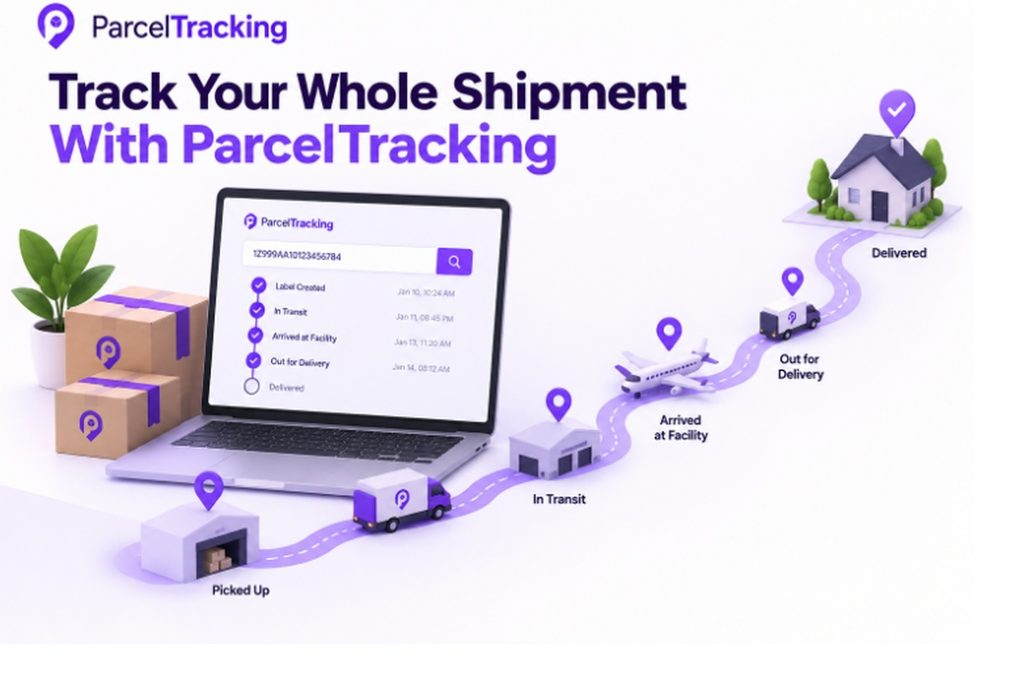
ParcelTracking brings tracking updates from different carriers into one timeline, so you can follow the journey without switching sites.
It helps when you need to:
- Track across carriers: Follow a parcel when the route changes hands.
- Identify the carrier: Paste the number and let the tracker detect its carrier automatically.
- Understand confusing statuses: Use the tracking status decoder for plain-English explanations.
- Check possible customs delays: Use the customs delay checker when international tracking goes quiet.
How it works:
Paste your tracking number → Carrier detected → Updates gathered → One timeline
You can start tracking without creating an account or selecting a carrier first.
Final Thoughts
Package tracking becomes easier to understand once you know updates reflect recorded events, not constant movement. A unified timeline gives you a clearer view when those events come from different carriers and shipment legs.
Instead of opening several carrier websites, start with the tracking number you already have. Paste it into one tracker and let the carrier be identified automatically. Then follow the shipment as new tracking events appear across its journey.
You can also see a predicted arrival window with a confidence score, giving more context than one fixed date. There is no need to figure out which carrier currently handles the parcel before tracking it.
Track your package now and see the latest available journey updates in one place.
Frequently Asked Questions
- What does “in transit” mean on a tracking number?
“In transit” means the carrier has recorded your package as moving through its network toward the destination.
- How accurate is package tracking?
Package tracking accurately reflects recorded carrier events, while delivery estimates can change because conditions may affect the shipment.
- Why does my tracking status not update right away?
Tracking may remain unchanged because the package has not reached another scan point or the latest event has not appeared online.
- How long does it take for tracking to update after shipping?
Tracking usually updates after the carrier receives and scans the package, but timing varies by carrier, service, and route.
- Can you track a package without a tracking number?
You generally need a tracking number or another shipment identifier to retrieve a package’s tracking information.
- What is the difference between a tracking number and a reference number?
A tracking number identifies a shipment for tracking, while a reference number usually identifies an order, invoice, or internal shipment record.
- Do all carriers use the same tracking technology?
Carriers use different systems, although many rely on barcode scanning, electronic records, APIs, data feeds, and GPS for selected operations.
- What does “out for delivery” mean?
“Out for delivery” means the package has entered its final delivery stage and is typically with the courier.
Leave a Reply